Overview
This document provides a technical and functional overview of the Usheru Tracking System, focusing specifically on the Tracking Service and the Tracking SDK. Its goal is to assist developers in understanding, maintaining, and evolving the core tracking infrastructure. The system is designed to capture user interaction events across web applications while strictly adhering to data privacy regulations such as the GDPR. As of the latest version, the tracking system does not store any user-identifiable information—instead, it relies entirely on anonymous session data and stripped, context-aware payloads.
Architecture Overview
The tracking system is composed of two tightly coupled components:
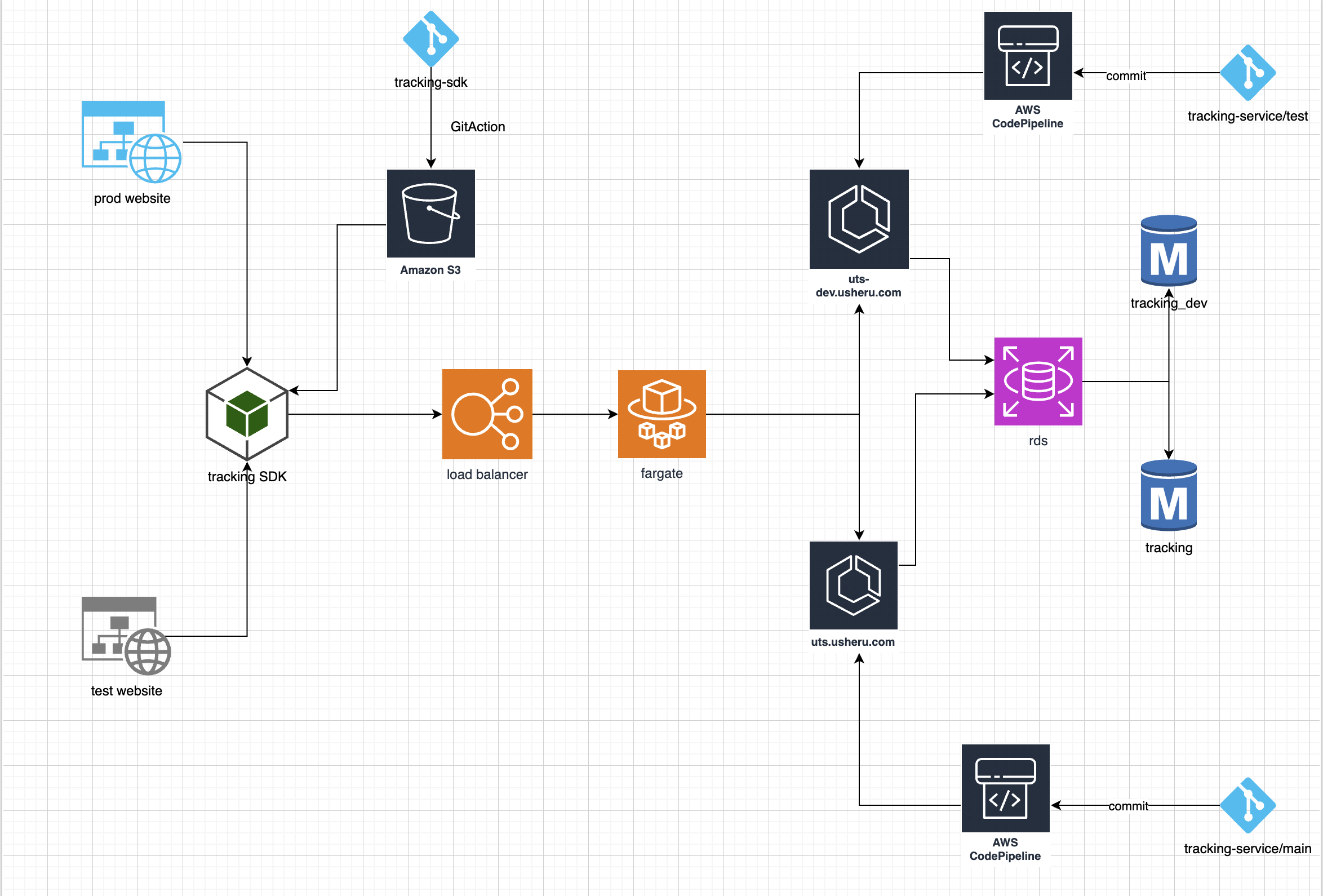
Flowchart Maker & Online Diagram Software
app.diagrams.net/?libs=general;aws4&src=about#G1Nn9cuUP_x_H8uJGPMuFT0amvxORlu1rp#%7B%22pageId%22%3A%22Ht1M8jgEwFfnCIfOTk4-%22%7D
🧩 Tracking SDK
A lightweight JavaScript/TypeScript library integrated into frontend applications. It captures user interactions (e.g., screen views, button clicks), enriches them with session and contextual data, and sends normalized event payloads to the tracking service. It manages session UUIDs, strips sensitive fields (e.g., uuidChannel) when required, and supports debug modes and dynamic configuration.
🛠️ Tracking Service
A lightweight JavaScript/TypeScript library integrated into frontend applications. It captures user interactions—such as screen views, button clicks, or custom events—and builds structured, normalized payloads. The SDK manages anonymous session identifiers (uuidSession) and enriches events with contextual metadata (e.g., domain, URL, timestamp). To ensure full GDPR compliance, all user-identifiable fields (such as uuidUser) are excluded from the final payload. Non-identifying metadata, such as uuidChannel or campaign parameters, may still be included when relevant for analytics. The SDK supports debug mode, environment-based configuration, and can operate in offline or mock modes for development and testing.
The architecture is fully GDPR-compliant by design. No user identifiers are stored or processed beyond session-level context, and the SDK enforces local data minimization before any communication with the backend occurs.
1. Tracking Service
1.1 What is the Tracking Service?
The Tracking Service is a stateless REST API application built in Java using Spring Boot.
Its main responsibility is to receive tracking events from the frontend SDK, validate and normalize them, optionally enrich them using session metadata, and store the result in a structured, privacy-compliant format.
This service is part of the wider tracking infrastructure but operates independently, exposing a single POST /event endpoint that can be consumed by any compatible SDK or frontend client.
It is designed to be:
Stateless (can scale horizontally)
Environment-aware (dev, production)
GDPR-compliant (does not store any user-identifiable data)
1.2. Technologies Used
Component | Technology |
Language | Java 21 |
Framework | Spring Boot 3.x |
JSON Processing | Jackson |
HTTP Client | Spring WebClient |
Validation | Bean Validation (Jakarta) |
Logging | Logback / SLF4J |
Build Tool | Gradle |
DB Support | PostgreSQL or BigQuery |
Testing | JUnit 5, Mockito |
Spring profiles are used to switch between environments (dev, prod) to allow for flexible deployments and local development.
1.3. Data Model
The Tracking Service stores its data in a PostgreSQL database, using two main tables: session_data and event_data. The system is designed to retain only anonymous session and event information, in strict compliance with GDPR — no user-identifiable data is stored at any point.
Events and sessions are internally linked by a session ID, allowing analytics and tracking without exposing personal information.
All data is stored as flattened JSON, making it easy to query and process efficiently at scale.
The overall structure is optimized for analytics use cases and high-volume ingestion.
13.1 session_data
This table holds information about each anonymous session. A session represents a group of events associated with the same visitor, identified by a uuidSession generated in the frontend SDK.
Main fields:
uuid_session: unique identifier for the session
uuid_channel: identifier for the traffic source or marketing channel (not personal)
domain: the domain from which the events were sent
session_payload: additional metadata (e.g. language, country, device)
created / updated: timestamps for record creation and updates
Each session is created or updated when a new event is received.
1.3.2 event_data
This table stores individual tracking events sent by the SDK. It is partitioned by week based on the event creation date, which improves performance and helps manage data retention efficiently.
Main fields:
event_name: the type of event (e.g. screenView, buttonClick)
event_type: optional category of the event
event_payload: the actual event data (already flattened and filtered)
event_path: the URL or screen where the event happened
created: the timestamp when the event was received
id_session_data: internal link to the session the event belongs to
Each partition of this table contains the events of a specific week.
1.4. API
The Tracking Service exposes a single REST endpoint used to receive tracking events from frontend applications via the SDK.
1.4.1 Endpoint
POST/api/event-data
Accepts a JSON payload representing a user interaction or event
Stores the event in the backend database after validation and processing
1.4.2 Functionality
This endpoint receives events such as screen views, button clicks, and other custom interactions. The payload includes contextual information like the session ID, domain, event type, and other non-personal metadata.
The service validates and stores each event in the event_data table, linked to its corresponding session in the session_data table. All event data is flattened and anonymized, ensuring GDPR compliance.
The API is defined using OpenAPI 3.1 and is documented under the tag EventTrackingApi. Legacy fields such as uuidUser are still present in the schema but are ignored at runtime.
1.4.3 Response
A successful request returns a 201 Created status, confirming that the event has been accepted and stored.
1.5. Development & Deployment
1.5.1 Branch Strategy
The Tracking Service follows a branch-based development flow:
main: used for production
test: used for staging and development
When working on new features or fixes, developers must:
Create a new branch from test (e.g. feature/my-new-feature)
Implement and test changes locally
Merge the branch into test for staging deployment
Once validated, open a pull request to main for production deployment
Each environment has its own deployment pipeline connected to the respective branch. Merging into test or main triggers automatic deployments to staging and production, respectively.
1.5.2 Build & Testing
Compilation, environment configuration, and testing processes are defined in the project’s CI/CD pipelines.
👉 For full details on:
How to build the project
How to run tests locally
How to configure environments ( dev, prod)
Docker & deployment instructions
2. Tracking SDK
The Usheru Tracking SDK is a lightweight JavaScript library designed to be integrated into frontend applications to automatically capture and send user interaction events to the Tracking Service.
It manages anonymous session tracking, captures key user actions (e.g. page views, clicks, visibility), and ensures that all data sent is privacy-compliant and enriched with contextual metadata when available.
2.1 Purpose
Track frontend events in real time
Generate and manage anonymous sessions (uuidSession)
Attach contextual data (e.g. UTM parameters, referrer, domain)
Avoid tracking bots or irrelevant traffic
Send structured, flattened, and anonymized payloads to the backend
Forward events to GTM (dataLayer) in parallel (if configured)
2.2 Technologies
The SDK is developed using a modern and lightweight JavaScript toolchain optimized for frontend integration:
Layer | Technology |
Language | JavaScript (ES modules) |
Bundler | |
Build Output | ESM-compatible, side-effect free |
Testing | |
DOM Mocking | |
HTTP Client | |
Obfuscation | vite-plugin-obfuscator, vite-plugin-javascript-obfuscator |
Compression | vite-plugin-compression |
Module System | ECMAScript modules ("type": "module") |
Build Scripts | Uses yarn build via vite build |
The SDK has no runtime dependencies beyond Axios, and is designed to be tree-shakable and side-effect free, making it ideal for integration into modern frontend frameworks or vanilla JS projects.
2.3 Main Functionalities
Session Management
Generates a unique uuidSession per visitor
Stores session info locally and reuses it
Automatically expires after a configurable time (default: 30 min)
Event Tracking
Predefined events: page_view, scroll, ad_click, ad_view, resize, etc.
Supports custom events via usheru_tag(...)
Enriches all events with context: UTM, referrer, domain
Bot Detection
Filters known bots/headless browsers based on heuristics
Visibility & Scroll
Tracks when elements become visible (IntersectionObserver)
Sends scroll events when reaching 90% of the page
Click Attribution
Detects click IDs (gclid, fbclid, ttclid, etc.) and maps them to source/medium
GTM Integration
Pushes flattened event payloads to dataLayer after server submission
Sensitive fields (e.g. uuidSession) are excluded
2.4 Usage
The SDK is designed to be initialized on app load and starts tracking automatically.
For detailed usage examples, integration steps, and full API reference:
👉 Please refer to the official SDK GitHub repositories:
2.5 Development & Build
Build, test, and deployment processes are defined in the SDK’s repository.
👉 For local setup, testing, and environment configuration, refer to the project’s README.
2.6 CORS Policy
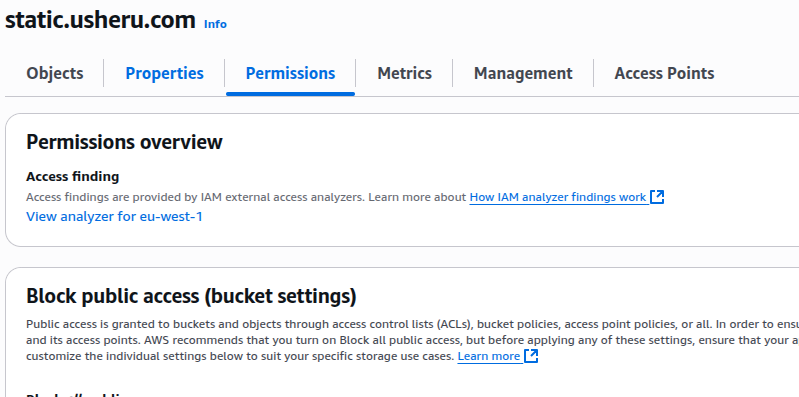
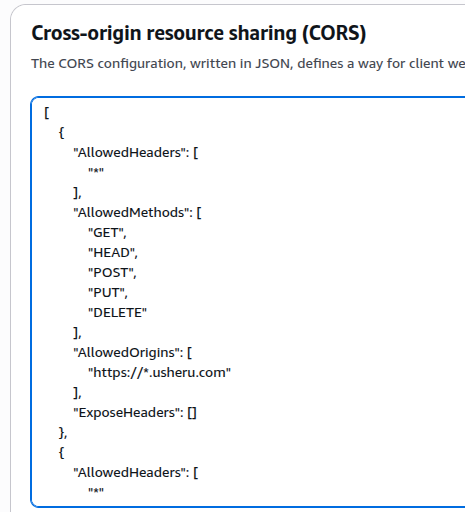
When on-boarding a new client we need to add the client domain into the CORS permission list of static.usheru.com S3 bucket in usheru-prod AWS account. This is where the latest SDK code resides.
AWS account - usheru-prod
S3 bucket - static.usheru.com