1. Introduction
The BBVision process is responsible for ingesting, processing, and synchronizing data coming from BBVision into the Usheru ecosystem.
Its main objectives are:
Migrate the entire historical dataset of movies and streaming availability.
Synchronize daily updates with new records.
Ensure consistency and deduplication of data in optimized PostgreSQL partitioned tables.
This process is designed to handle millions of records efficiently, avoiding memory issues and meeting production ingestion time windows.
2. BBVision – High-Level Architecture and Orchestration
Before diving into scripts and detailed processes, it is important to understand the high-level components involved in the BBVision ingestion and synchronization pipeline.
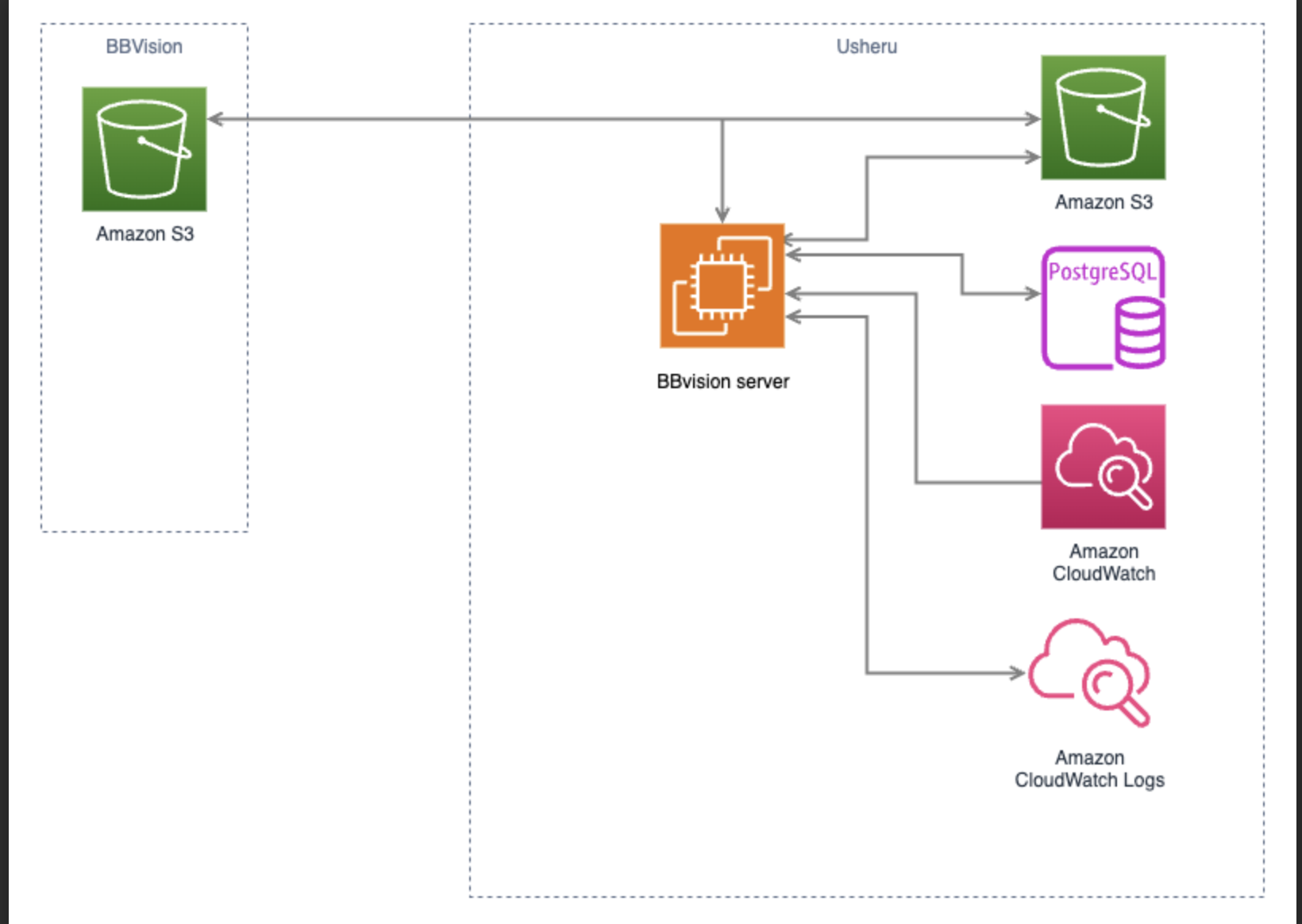
2.1 Core Components
2.1.1 BBVision Orchestration Server
A dedicated server (VM/EC2/on-prem) that runs the orchestration logic.
Executes the bbVisionAll script, which in turn triggers specialized sub-scripts.
All orchestration and helper scripts are stored under
/media/data/bb_vision_import/scripts.Uses rclone to mount S3 buckets as local file systems, with a caching layer for operations not natively supported by S3.
Provides staging space (NVMe/disk) for temporary processing.
Logs are written to
/media/data/bb_vision_import/logs/YYYY/MM/DD/*.log.The Usheru S3 bucket is mounted and accessible locally under
/home/ec2-user/rclone-mount-prod/yyyy-mm-dd/.
2.1.2 BBVision S3 Bucket
Source bucket where BBVision delivers daily data in date-based folders.
Structure:
Content/
latest/ → most recent daily folder.
historical/ → historical archives.
Platforms/latest → contains global file
globalplatforms.jsonl.
All files are in JSONL format.
Usheru retrieves these files daily using the
sync_data.shscript and copies them into the Usheru S3 bucket.
2.1.3 Usheru S3 Bucket
Destination bucket under Usheru’s control.
Stores copies of all BBVision source files plus additional processed artifacts.
Processing is performed by the binary
usheru_streaming.jar, which generates an Output/ folder containing:*.changes.jsonlfiles.Aggregated CSV files per country.
SQL files to be applied to the database.
Two scripts execute this process:
usheru_bbvision.sh→ the regular script for calculating daily differences.usheru_bbvision_historical.sh→ used for the initial historical load of streaming data.
Intermediate storage bucket under Usheru’s control.
Stores validated and staged data before processing.
Ensures separation between raw supplier data (BBVision) and processed artifacts.
Used for resilience and to decouple ingestion speed from downstream processing.
2.1.4 Usheru PostgreSQL Database
Destination database where final records are loaded.
Partitioned tables (
movie_streaming) handle large data volumes.Supports bulk loading via
COPYand transactional updates.Maintains referential integrity through foreign keys (movie, streaming, svod plans, currencies, etc.).
2.1.5 CloudWatch
Monitoring and observability layer.
Log source: daily rotated files under
/media/data/bb_vision_importer/logs/YYYY/MM/dd/*.logon the orchestration server.A CloudWatch Agent tails/consumes these files each day and ships them to CloudWatch Logs.
Alerts can be configured on error patterns or missing runs; metrics (e.g., ingestion duration, row counts, error rates) can be derived from logs or emitted by scripts if needed.
2.2 High-Level Flow
Data Delivery → BBVision drops files daily into the BBVision S3 bucket (
Content/latest,Content/historical,Platforms/globalplatforms.jsonl).S3 Synchronization → the orchestration server (via
sync_data.sh) copies data from BBVision S3 into the Usheru S3 bucket.Processing & Delta Generation → using
usheru_streaming.jar, data is validated, normalized, enriched, and deltas are calculated to determine inserts, updates, or disables for the database.Database Update → bulk
COPYoperations and batchedUPDATE/UPSERTstatements are applied into Usheru PostgreSQL.Monitoring & Alerts → logs under
/media/data/bb_vision_importer/logs/YYYY/MM/dd/*.logare consumed by the CloudWatch Agent. Metrics and alerts are raised on ingestion duration, row counts, and failures.
3. Implementation Details
Here we will describe each script and binary used in the process. Each section will include its purpose, responsibilities, possible arguments, and outputs. No code will be shown here, except for usheru_streaming.jar, where the most important classes will be briefly explained for clarity.
3.1 Orchestration Entry Point (bbVisionAll.sh)
Purpose
Serves as the main entry point for the BBVision orchestration. It sequentially executes all required scripts to run the ingestion and synchronization pipeline end-to-end.
Responsibilities
Define the execution environment (
prodordev).Create the daily log directory structure.
Execute the list of scripts sequentially.
Generate a per-script log file if the
auto_logflag is active.
Arguments
ENVIRONMENT:prod(default) ordev. Determines which scripts are executed and where logs are stored.
Outputs
Main orchestration log:
/logs/YYYY/MM/DD/run_all.log.Per-script logs:
/logs/YYYY/MM/DD/<script>.log.
3.2 Mount S3 Buckets with Cache (mount_rclone.sh)
Purpose
Provide a reliable, cached local mount of the target S3 bucket so downstream jobs can read/write via standard filesystem semantics. The mount is performed twice (once at pipeline start and again just before processing) to prevent stale connections and endpoint transport errors.
Responsibilities
Determine the execution environment (prod or dev).
Select the correct remote and mount point:
dev →
aws_s3_deep:usheru-bbvision-data-dev at /home/ec2-user/rclone-mountprod →
aws_s3_prod:usheru-bbvision-data at /home/ec2-user/rclone-mount-prod
Unmount any existing mounts using fusermount3 -uz to avoid conflicts.
Clean the VFS cache directory:
/media/data/bb_vision_import/rclone-mount-cachedir.Mount with rclone using tuned parameters (full VFS cache, read-ahead, chunked reads, single transfer, mmap, umask, daemon mode, verbose logs).
Ensure the mount is fresh and healthy before processing begins.
Arguments
ENVIRONMENT(positional, optional):prod(default) ordev. Controls which remote and mount point are used.
Tools & Key Parameters
fusermount3 -uz→ force unmount existing FUSE mounts.rm -rf /media/data/bb_vision_import/rclone-mount-cachedir/*→ clear the cache safely.rclone mount <remote> <mountPoint>with:--vfs-cache-mode full→ enables full file-based caching, required for random access writes/reads.--vfs-cache-max-size 6G→ maximum size of the local cache; old data is purged when the limit is reached.--vfs-cache-poll-interval 1m→ interval to check and clean the cache.--cache-dir /media/data/bb_vision_import/rclone-mount-cachedir→ directory where cached data is stored.--buffer-size 8M→ amount of memory buffered per open file.--vfs-read-ahead 32M→ how much extra data to read ahead when reading a file.--vfs-read-chunk-size 8M→ initial size of chunks to read when accessing files.--vfs-read-chunk-size-limit 64M→ maximum size of chunks to grow to during reads.--transfers 1→ limits concurrent file transfers to one, reducing resource contention.--dir-cache-time 30m→ how long to cache directory structure before refreshing.--poll-interval 1m→ frequency of checking for remote changes.--use-mmap→ use memory-mapped files to speed up access.--umask 002→ sets default file permissions so group members have write access.--daemon -vv→ runs mount as a background process with verbose logging.
Outputs
Mounted filesystem at:
/home/ec2-user/rclone-mount(dev)/home/ec2-user/rclone-mount-prod(prod)
Cleaned cache at
/media/data/bb_vision_import/rclone-mount-cachedir.Console/log lines indicating unmount, cache clean, and mount success.
3.3 Synchronize BBVision to Usheru S3 (sync_data.sh)
Purpose
Copy the daily BBVision payload from the source object store (DigitalOcean Spaces) into the Usheru S3 bucket, organizing it by date so downstream processing can run deterministically against that day’s snapshot.
Responsibilities
Validate the execution environment (
prodordev).Resolve today’s date (YYYY-MM-DD) to build the destination path.
Define sources:
do_spaces:bb-usheru/Contentdo_spaces:bb-usheru/Platforms
Define destinations (per environment), under the dated prefix
prod →
aws_s3_prod:usheru-bbvision-data/<YYYY-MM-DD>/Contentand/Platformsdev →
aws_s3_deep:usheru-bbvision-data-dev/<YYYY-MM-DD>/Contentand/Platforms
Perform two
rclone copyoperations (Platforms first, then Content) with progress and logging.Append start/end log lines with timestamps to the sync log.
Arguments
ENVIRONMENT(positional, optional):prod(default) ordev. Selects destination remote/prefix.
Tools & Key Parameters
rclone copy
<src><dst>-P --log-file=/media/data/bb_vision_import/logs/rclone_sync.log-P→ show progress (also ensures periodic status in logs).--log-file→ appends detailed copy output to the central sync log.
Date resolution:
YYYY-MM-DDis used as the top-level folder to ensure immutable daily snapshots.Remotes:
do_spaces:(source),aws_s3_prod:/aws_s3_deep:(destinations).
Outputs
Data copied to:
s3://usheru-bbvision-data/<YYYY-MM-DD>/{Content,Platforms}(prod)s3://usheru-bbvision-data-dev/<YYYY-MM-DD>/{Content,Platforms}(dev)
Log file appended at:
/media/data/bb_vision_import/logs/rclone_sync.logwith start/finish markers and rclone progress lines.
3.4 Export Movie Data (movie_export_dump.sh)
Purpose
Export the current movie dataset from PostgreSQL into a CSV file. This export acts as a reference table for mapping external identifiers (imdb, tmdb, eidr, bbvision_id) to internal id_movie values.
Responsibilities:
Define the output directory
/media/data/bb_vision_import/Movie.Remove any existing files before creating a new export.
Connect to the PostgreSQL production database.
Run a COPY query that extracts key movie fields (
id_movie, title, bbvision_id, imdb, tmdb, eidr, content_type).Ensure results are ordered by external identifiers for consistent downstream indexing.
Arguments:
No runtime arguments. Connection details (
PGINSTANCE, PGUSER, PGDATABASE) are defined inside the script.
Tools & Key Parameters:
psql -c "\\copy (...) TO 'file.csv' CSV HEADER"→ exports query results directly to CSV with a header row.r
m -rf $OUTPUT_DIR/*→ clears old files before export.
Outputs:
CSV file generated at /media/data/bb_vision_import/Movie/movie_export.csv.
File includes headers and rows sorted by identifiers (bbvision_id, imdb, tmdb, eidr).
Console/log messages confirm successful generation.
3.5 Export Movie Streaming Data (movie_streaming_dump_copy.sh)
Purpose
Export all current movie streaming records from PostgreSQL partitions into CSV files, grouped by country. These CSVs are used as the baseline for detecting new, updated, or disabled streaming entries when calculating deltas.
Responsibilities
Define the output directory
/media/data/bb_vision_import/Movie/movie_streaming.Query PostgreSQL to detect existing partitions under movie_streaming (temporarily movie_streaming_part until migration is complete).
Iterate over each partition and build an export query selecting all relevant fields (
id_movie_streaming, id_streaming, id_movie, identifiers, plan IDs, format, price, currency, URL, etc.).Cleanse URLs by removing newline and carriage return characters.
Order the output by
bbvision_hash_uniqueand normalized streaming attributes to ensure consistency.Export the results of each partition to a separate CSV file, named after the partition/country.
Arguments
No runtime arguments; PostgreSQL credentials (
PGINSTANCE, PGUSER, PGDATABASE) and output paths are hardcoded in the script.
Tools & Key Parameters
psql -c "\\copy (...) TO 'file.csv' WITH (FORMAT CSV, HEADER TRUE, ENCODING 'UTF8')"→ exports partition data directly to CSV with headers.Partition detection query: uses
pg_inheritsandpg_classto list all child partitions ofmovie_streaming.Naming convention: output files are named
movie_streaming<COUNTRY>.csv.
Outputs
One CSV file per partition (per country) stored under
/media/data/bb_vision_import/Movie/movie_streaming/.Each file contains all streaming records with headers, cleaned URLs, and consistent ordering.
Console/log output showing partition detection, file generation, and completion messages.
3.6 Processing Scripts
3.6.1 Daily Streaming Processing (usheru_bbvision.sh)
Purpose
Execute the daily streaming delta processing from BBVision into Usheru’s system. This script calls the usheru_streaming.jar binary in daily mode (bbVisionDump), comparing the latest BBVision snapshot against the database to calculate and apply inserts, updates, and disables.
Responsibilities
Define the execution environment (
prodordev).Select the correct mount point where S3 buckets are available via rclone:
dev →
/home/ec2-user/rclone-mount/prod →
/home/ec2-user/rclone-mount-prod/
Prepare daily log directories under
../logs/YYYY/MM/DD/.Redirect all output (
stdoutandstderr) tobbVisionImporter.log.Launch the Java process with appropriate heap memory (
-Xmx3072m).Run the main class
com.usheru.streaming.tasks.StreamingTaskMain in mode bbvisionDump.Pass parameters for input/output directories, step mode, and batch size.
Report success or failure based on the exit code of the Java process
Arguments
ENVIRONMENT(positional, optional):prod(default) ordev. Controls the mount point used.
Tools & Key Parameters
Java process (
usheru-streaming.jarwithlib/*and config on the classpath).Main class:
com.usheru.streaming.tasks.StreamingTaskMain.Params :
Mode:
bbvisionDumpDate:
today(default) or a specificYYYY-MM-DD.Source mount:
$MOUNT_POINT.Movie directory: /
media/data/bb_vision_import/Movie/.Threads:
1.STEP:
INIT_STEPby default; can be overridden when neededBatch size: 200000 (insert/update batches).
Logs: Written to
../logs/YYYY/MM/DD/bbVisionImporter.log.
Outputs
Daily streaming data fully processed by usheru_streaming.jar.
Log file with detailed execution trace.
3.6.2 Historical Streaming Load (usheru_bbvision_historical.sh)
Purpose
Execute the initial load of streaming records from BBVision into Usheru’s system. This script calls the usheru_streaming.jar binary in a special historical mode, processing all historical dumps rather than only daily deltas.
Responsibilities
Define the execution environment (
prodordev).Select the correct mount point where S3 buckets are available via rclone:
dev →
/home/ec2-user/rclone-mount/prod →
/home/ec2-user/rclone-mount-prod/
Prepare daily log directories under
../logs/YYYY/MM/DD/.Redirect all output (
stdoutandstderr) tobbVisionHistoricalImporter.log.Launch the Java process with appropriate heap memory (
-Xmx3072m).Run the main class
com.usheru.streaming.tasks.StreamingTaskMain in mode bbvisionHistoricalDump.Pass parameters for input/output directories, step mode, and batch size.
Report success or failure based on the exit code of the Java process.
Arguments
ENVIRONMENT(positional, optional):prod(default) ordev. Controls the mount point used.
Tools & Key Parameters
Java process (
usheru-streaming.jarwithlib/*and config on the classpath).Main class:
com.usheru.streaming.tasks.StreamingTaskMain.Params :
Mode:
bbvisionHistoricalDumpDate:
today(default) or a specificYYYY-MM-DD.Source mount:
$MOUNT_POINT.Movie directory: /
media/data/bb_vision_import/Movie/.Threads:
1.STEP:
INIT_STEPby default; can be overridden when neededBatch size: 200000 (insert/update batches).
Logs: Written to
../logs/YYYY/MM/DD/bbVisionHistoricalImporter.log.
Outputs
Historical streaming data fully processed by usheru_streaming.jar.
Log file with detailed execution trace.
3.7 Update Streaming Availability (streaming_availability.sh)
Purpose
Apply SQL scripts that recalculate and persist streaming availability flags in the PostgreSQL database (e.g., after deltas are applied), ensuring downstream consumers see a consistent state.
Responsibilities
Resolve the ordered list of SQL files to run from schema_sql/ (e.g., update_streaming_availability.sql).
Execute each SQL file in sequence, aborting immediately on the first error.
Log progress to console and report total runtime (HH:MM:SS).
Use a consistent psql execution profile so the run is deterministic and safe.
Arguments
None at runtime. Connection settings (PGINSTANCE, PGUSER, PGDATABASE) and the SQL folder (SQL_DIR=schema_sql) are defined in the script.
Tools & Key Parameters
psqlwith flags:-X→ do not read startup files (ensures clean, predictable environment).-v ON_ERROR_STOP=1→ stop on the first SQL error.-q→ quiet mode (less noise in logs).-t -A -F '|'→ tuple-only, unaligned output, with pipe as field separator (consistent parsing if needed).
SQL_FILES array → defines execution order (first match wins; later files can depend on earlier ones).
Outputs
All SQL files in schema_sql/ (listed in the script) executed successfully, or early termination on error.
Console messages indicating each script executed and a final success line.
Duration summary showing total time taken.
3.8 Core Processing Binary (usheru_streaming.jar)
3.8.1 Main entry point(StreamingTaskMain)
Purpose
Central entry point that parses CLI arguments (date, mode, paths, STEP, threads, batch sizes), initializes dependencies (config, logging, DB/S3 access), and dispatches to the appropriate importer implementation.
Responsibilities
Parse mode (bbVisionDump for daily, bbvisionHistoricalDump for historical).
Validate required paths (mount point, /media/data/bb_vision_import/Movie/).
Resolve STEP (defaults to INIT_STEP), and orchestrate step-by-step execution.
Wire core services (file readers, diff calculators, index stores, DB writers).
3.8.2 Process Definition (BaseImporter)
Purpose
Provide a generic process definition that standardizes the ingestion lifecycle. The base importer acts as a reusable template that ensures every run follows the same sequence:
Load and prepare input files.
Normalize and clean data.
Build indexes and perform lookups against the database baseline.
Detect deltas (new, updated, disabled).
Generate artifacts (CSV, SQL, JSONL).
Optionally apply updates directly to the database.
Perform housekeeping, reporting, and checkpointing.
Responsibilities
Define the canonical step pipeline (streaming, plans, movies, movie streaming).
Provide common hooks for initialization, reporting, error handling, and cleanup.
Manage progress tracking and record timings for each step.
Guarantee consistency and determinism in outputs regardless of daily or historical mode.
Expose extension points that allow concrete implementations (daily vs historical) to customize specific steps while reusing the shared structure.
3.8.3 Daily implementation (BBVisionImporter)
Purpose
Run the daily BBVision import in delta mode: prepare the latest snapshot, update platforms/aliases and SVOD plans, reconcile movies, generate and apply movie_streaming changes per country, and record a task log with metrics and timings.
Responsibilities
Preparation & folder context
Resolve the current and previous dates; build FolderPath for today and previous.
In
INIT_STEP, useContentProcessorto preprocess and detect differences between days.
Platforms & Aliases (
STREAMING_STEP)StreamingSyncService→ syncs platforms and aliases from JSON into DB and artifacts.
SVOD Plans (
SVOD_PLAN_STEP)SvodPlanSyncService → processes Packages/Plans from JSON changes and upserts them into DB.
Shared mappings
ServiceMappingProvider→ provides service maps (movies, platforms, countries, currencies, plans).Called via generateMappings() after critical phases.
Movies pipeline
MovieFileProcessor→ reads and processes movie files.MoviePopulator→ enriches movies with id_movie, generates new movie files, handles duplicates.MovieDataSyncService→ syncs movies with DB (chunked upserts).
Movie Streaming pipeline
FileGrouper→ groups raw flattened files by country.FlattenedFileAggregator→ aggregates/normalizes movie_streaming into CSV per country.FlattenedFileSorter→ sorts CSVs in parallel for deterministic comparison.StreamingCsvDiffProcessor→ compares generated CSV vs DB export, produces SQL/CSV for inserts, updates, disables.MovieStreamingSyncServices→ applies SQL and CSV updates to the partitioned tables.
Task log & metrics
TaskLogService→ persists start/end times and results.TaskResult/Counter→ stores counts (platforms, plans, movies, streaming) and timing per step.Final summary logged by
generateReport().
Operational controls
Step gating with Step enum (supports partial re-runs).
Parallel execution configurable (
config.getNumThreads()).Per-country partition tables resolved dynamically (
<table>_<countryCode>).Non-zero exit on critical failures; skipped countries tracked in
non_updated_country.txt.
3.8.3. Historical implementation(BBVisionHistoricalImporter)
Purpose
Run the historical BBVision import optimized for large backfills: prepare and normalize historical inputs, update platforms/aliases and SVOD plans, reconcile and upsert movies (including assigning missing bbvision_id), generate and apply full movie_streaming inserts per country, and record a task log with metrics and timings.
Responsibilities
Preparation & folder context
Resolve the target historical date and build a single FolderPath for that day.
In INIT_STEP, use ContentProcessor (historical mode) to preprocess all historical files in parallel (
config.getNumThreads()).
Platforms & Aliases (
STREAMING_STEP)StreamingSyncService→ initialize from folder and sync platforms and aliases from JSON.Checkpoint after successful completion.
SVOD Plans (
SVOD_PLAN_STEP)SvodPlanSyncService→ process plan definitions from JSON (create/update).Checkpoint after completion.
Shared mappings
generateMappingsto refresh lookups (movies, platforms, countries, currencies, plans) before downstream steps.
Movies pipeline (historical)
MOVIE_PROCESS_STEP:MovieFileProcessor→ parse and clean historical movie files.MoviePopulator→ populate and generate missing movies, updatingbbvision_idfor movies that previously had none (this differs from the daily importer, which does not adjust missing IDs).
MOVIE_SQL_STEP:MovieDataSyncService→ ingest newly discovered titles and persist updated IDs (including newbbvision_idassignments).MoviePopulatorfinalizes the enriched movie file.
Checkpoint per step.
Movie Streaming pipeline (historical)
MOVIE_STREAMING_PROCESS_STEP:FileGrouper→ group flattened inputs by country.FlattenedFileAggregator(historical mode) → aggregate and transform to per-country CSV undermovie_streaming/.Unlike the daily process (which calculates deltas), the historical importer processes the complete set of movie_streaming records, generating full insert files.
For each country, use
StreamingCsvDiffProcessorto build insert-only artifacts into /SQL.
MOVIE_STREAMING_SQL_STEP:Discover insert CSVs via
loadSqlInsertFilePaths.MovieStreamingSyncServicesto insert in parallel per country (partitioned targets like<table>_<cc>).
Checkpoint per step.
Task log & metrics
Create/update
TaskLog(TaskLogService) with start/end times andTaskResult/Countermetrics (platforms, plans, movies, streaming totals and per-country).Per-step timings recorded via
messureProcessing(...).Emit a historical import summary report at the end.
Operational controls
Step gating with Step enum (supports partial re-runs and recovery).
Parallelism controlled by
config.getNumThreads(); large-scale processing uses batch/chunk settings (chunkSize).Deterministic per-country targets (partition naming
<table>_<countryCode>).Robust error handling with clear logging; non-zero exit on critical failures.
4. BB-Vision Server
We have an EC2 server in usheru-prod named bb-vision. This contains all the scripts required for the bb-vision daily sync process under /media/data/bb-vision-imports/scripts. We have a cron job that runs the daily sync at 6AM UTC. These were the steps followed to create the server and make it ready for the bb-vision process -
Create an EC2 server - Start a new t3.medium Amazon Linux 2 or Amazon Linux 2023 server with the latest AMI.
Config:
IAM role - bbvision-role
Security groups - prod-ssh, prod-db-access
Keypair - prodcution
Storage - 30Gb apart from 8Gb default root storage
VPC - Production
Elastic IP - 52.49.235.247
Install JAVA - Connect to the server using production keys or your personal keys(add IP to prod-ssh security group).
Amazon Linux 2 -
sudo amazon-linux-extras enable java-openjdk11
sudo yum install -y java-1.8.0-openjdk
Amazon Linux 2023 -
sudo dnf install -y java-1.8.0-openjdk
Verify JAVA installation using -
java -version
Install PSQL -
Amazon Linux 2 -
sudo amazon-linux-extras enable postgresql15
sudo yum clean metadata
sudo yum install -y postgresql
Amazon Linux 2023 -
sudo dnf install -y postgresql15
Verify psql installation - psql --version
Create a .pgpass file with entry -"http://proddb.cnqvvsiike7o.eu-west-1.rds.amazonaws.com:5432:usheru_db:usheru_user:xxxxxxxxxxxxx" and check with admins for password (@luis Villa, @Deepanshu Narwat )
chmod 400 .pgpass
Install and setup rclone - We are using rclone library to do the daily data sync from bb-vision S3 bucket to our S3 bucket. Follow these steps to install rclone and setup remotes
curl https://rclone.org/install.sh | sudo bashcreate remotes -
rclone config create bbvision(use the following config)
Type : S3
Provider : Other
Access Key : get from admins (Luis or Deep)
Secret Access Key : get from admins (Luis or Deep)
Endpoint : https://nyc3.digitaloceanspaces.com
rclone config create usheru(use the following config)
Type : S3
Provider : AWS
Access Key : get from admins (Luis or Deep)
Secret Access Key : get from admins (Luis or Deep)
Region : eu-west-1
Check the remote config by
rclone listremotesor by viewing the file in~/.config/rclone/rclone.conf
Install fusermount -
Amazon Linux 2 -
sudo yum install -y fuse fuse3 fuse3-develsudo modprobe fuse
Amazon Linux 2023 -
sudo dnf install -y fuse3 fuse3-develsudo modprobe fuse
Once all this setup is complete we are ready to import the bb-vision scripts and setup a crontab entry for the daily run.